Productivity & Automation

Tactiq review
Pricing, features, pros and cons of the bot-free AI note taker
- Published:
- Category:
- Productivity & Automation
Disclosure: this page contains an affiliate link. If you sign up to Tactiq through it, GeekyBuzz may earn a commission at no extra cost to you. It does not change what we write.
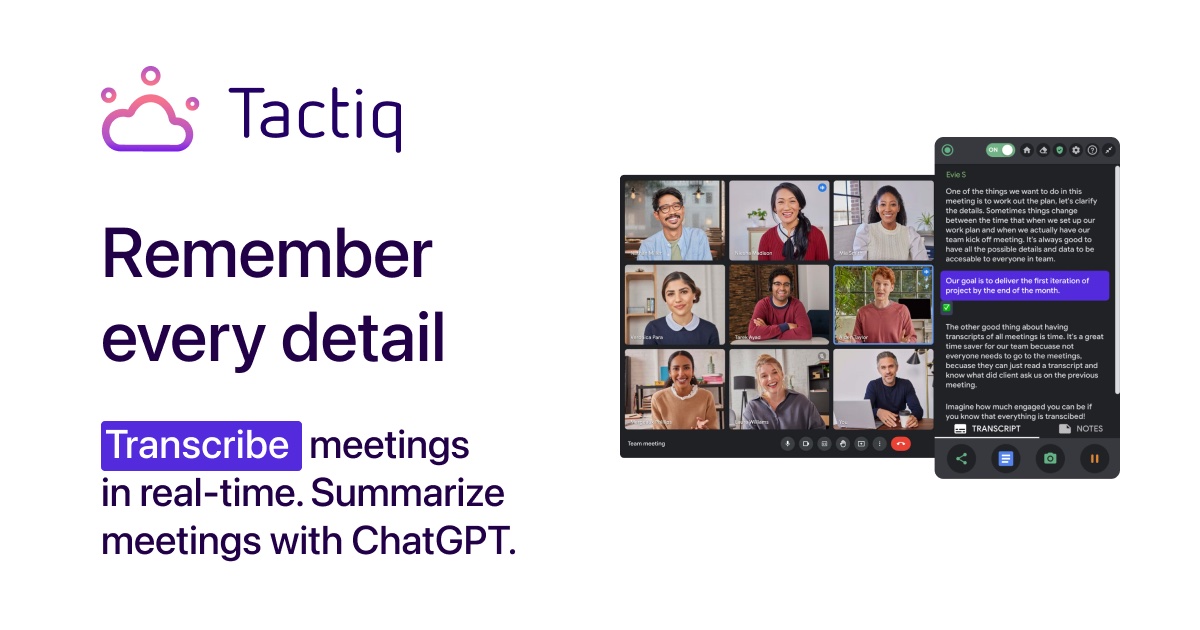
Taking notes while you are meant to be listening is a bad trade. Tactiq is a Chrome extension that transcribes your meetings live and then writes the summary and action items for you, without a bot joining the call. This review covers how it works, what each plan costs, and who gets the most from it.
What is Tactiq?
Tactiq is an AI note taker for Google Meet, Zoom and Microsoft Teams. Instead of sending a bot into the meeting, it runs as a browser extension and captures the transcript on your own screen. It identifies speakers, supports more than 60 languages, and turns the transcript into summaries, action items and follow-up emails. The company reports over a million users and a 4.8 rating from more than 3,000 Chrome Web Store reviews, which are its own figures.
Key features
- Live transcription with no bot. Nobody else on the call sees a recording assistant join.
- Speaker identification and support for 60+ languages.
- AI summaries and action items in one click, including custom prompts you can reuse.
- Ask AI during meetings to get answers and catch-up summaries while the call is still going.
- AI workflows that share meeting insights to Slack, Notion, Linear, HubSpot and other tools.
- Sharing and export of transcripts, with team auto-sharing on higher plans.
Tactiq pricing
Tactiq has a free plan with 10 transcripts a month. Paid prices below are per user per month with annual billing, as listed when we checked. The site says annual billing saves up to 33% and shows prices in your local currency, so check the live page.
| Plan | Price per user per month (billed yearly) | Transcripts | AI credits |
|---|---|---|---|
| Free | $0 | 10 per month | 5 per month |
| Pro | $8 | Unlimited | 10 per month |
| Team (1 to 20 users) | $16.67 | Unlimited | Unlimited |
| Business (20 to 200 users) | $29.17 | Unlimited | Unlimited |
| Enterprise (200+ users) | Custom | Unlimited | Unlimited |
Pro adds the option to pause automatic transcription and turn off the transcript notification. Team adds priority support and auto-sharing of transcripts. Business adds advanced data retention, SAML SSO, a customer success manager and the Tactiq MCP and Claude connector (both in beta). Enterprise adds a custom data processing agreement and a dedicated account manager. There is also a discounted plan for teachers and students.
Pros and cons
Pros
- No bot joins the meeting, which keeps calls feeling normal.
- Works across Google Meet, Zoom and Teams from one extension.
- A usable free plan, and Pro is only $8 per user per month on annual billing.
- Summaries, action items and custom prompts save time after the call.
- Support for 60+ languages.
Cons
- It is a browser extension, so it fits Chrome best and depends on you running it in the meeting.
- The free plan is limited to 10 transcripts and 5 AI credits per month.
- Pro has only 10 AI credits per month, so heavy AI users need Team or higher.
- Prices are shown on annual billing, so monthly costs more.
- Recording consent still rests with you, even without a visible bot.
Who is Tactiq for?
- Good fit: freelancers, consultants and sales people who sit in many customer calls.
- Good fit: teams that want shared transcripts and summaries without a bot on every call.
- Weaker fit: people who need recordings of in-person or phone meetings, since it works inside browser meetings.
- Weaker fit: anyone with only one or two meetings a month, who may be fine on the free plan.
How to get started
Add the free Chrome extension, join a real meeting and let it transcribe. Use the one-click summary afterwards and see whether the action items match what you would have written. If you hit the 10-transcript limit, Pro is the cheapest way to remove it.
Frequently asked questions
Is Tactiq free?
Yes. The free plan includes 10 transcripts and 5 AI credits per month, with no credit card.
Does a bot join my meeting?
No. Tactiq runs as a Chrome extension and does not add a bot to the call.
Which meeting apps does it support?
Google Meet, Zoom and Microsoft Teams.
How many languages does it support?
More than 60, according to the company.
Can I connect it to other tools?
Yes. AI workflows can share meeting insights to Slack, Notion, Linear, HubSpot and more. MCP and a Claude connector are in beta on Business.
Final verdict
Tactiq is an easy way to stop taking notes by hand. It is bot-free, works with the three big meeting apps, and the free plan is enough to judge it properly. The limits are the browser-extension approach and the small AI credit allowance on Pro. For solo professionals, Pro is good value; teams should compare Team and Business based on how much AI they will use.
Still deciding?
Browse the rest of our reviews, or put two tools side by side.